Judge your solution before you submit
LocalJudge is a VS Code extension that runs your C++, C, Java, Python or JavaScript solution against a problem's sample tests and your own cases. Verdicts, timing and the first wrong token show up next to your code.
- VS Code
Chrome import companion coming soon · VS Code 1.106 or later. Tested on macOS. Needs the compiler or runtime for your language (clang++, clang, a JDK, python3 or node).
Why it exists
Copying samples by hand is slow and error-prone
During a contest you copy the sample input into a terminal, run your program, and squint at the output to compare it with the statement. Do that for three samples and two edge cases on every change and the minutes add up. LocalJudge keeps the tests with the problem and checks them in one command.
Features
What LocalJudge does
Five languages
Write in C++, C, Java, Python or JavaScript. Each language gets its own solution file and shares the same tests.
Clear verdicts
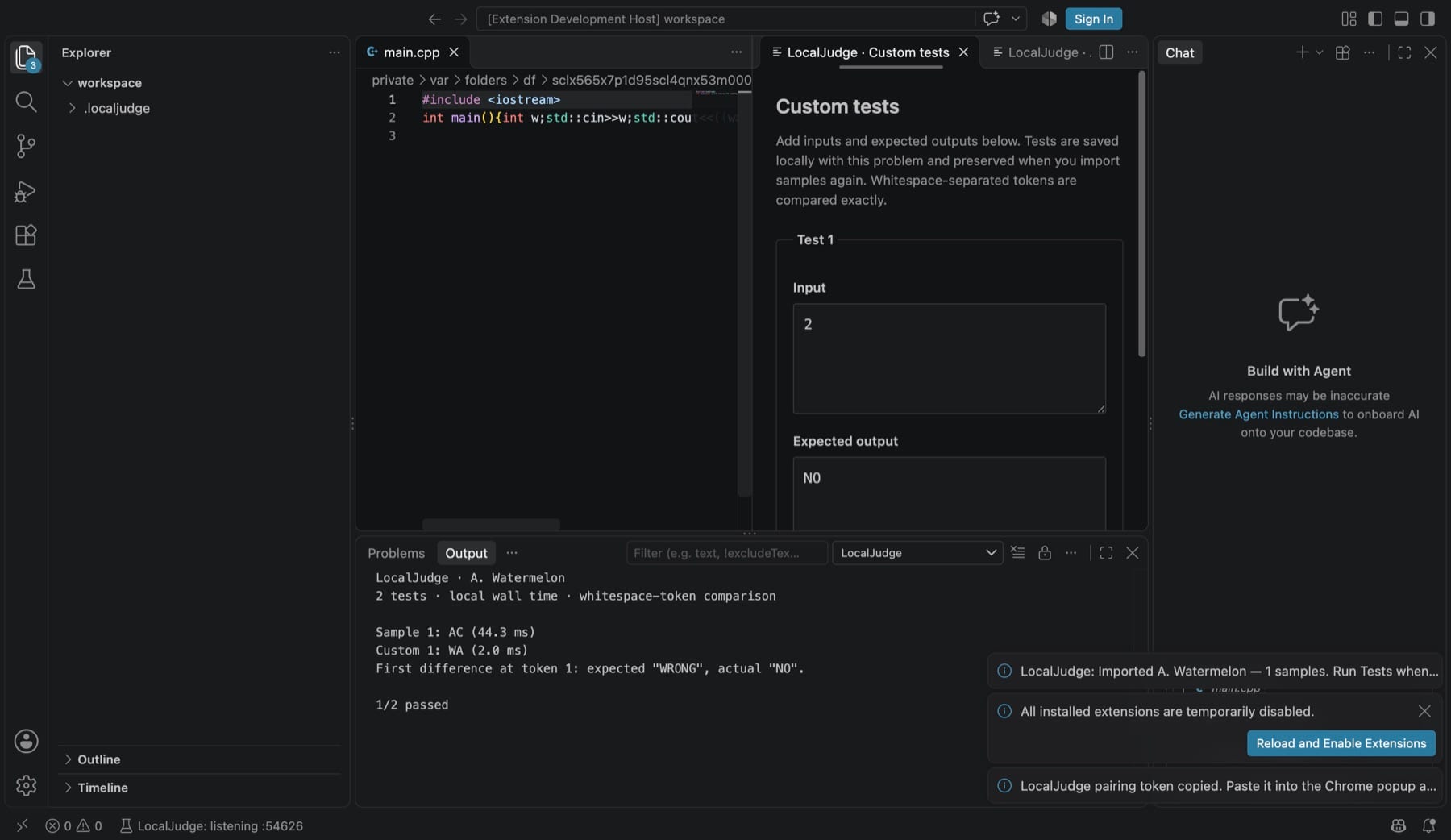
Every test reports AC, WA, CE, RE, TLE, OLE or CANCELLED, with local timing and compiler diagnostics when a build fails.
First wrong token
Wrong answers point to the first differing token, including missing or extra output, with full expected and actual output below.
Custom tests
Add, edit and remove your own input and expected-output cases. They are saved with the problem and kept when samples are imported again.
Starter code per language
New solution files start from a built-in template for the chosen language, so you can begin typing the logic straight away.
One shortcut to run
Press Cmd+Alt+J on macOS or Ctrl+Alt+J elsewhere to save and judge the current solution. Cancel a long run at any time.
Your own toolchain
Set compiler and runtime paths, arguments and the time limit in VS Code settings. Commands run directly, without a shell.
How it works
How a problem flows through LocalJudge
Import the samples
Open a problem on Codeforces, AtCoder, CodeChef or CSES and click the LocalJudge companion in Chrome. The samples land in your VS Code workspace.
Pick a language
Choose a solution language. LocalJudge opens a starter file for it beside the tests.
Run the tests
Press Cmd+Alt+J. Each sample and custom test gets a verdict and timing.
Add edge cases
Open Edit Custom Tests, add the cases you are worried about, and run again before you submit.
Why LocalJudge
Built differently
Honest about what it checks
Comparison is exact, whitespace-separated tokens. It says plainly that floating-point tolerance, multiple valid answers and interactive problems need the official judge.
Paired, local-only import
The browser companion talks to VS Code over 127.0.0.1 with a pairing token, and imports never run code. Nothing goes through a hosted service.
Careful with your files
Reimporting a problem replaces only the samples. Your solutions and custom tests are preserved, and corrupt data is never silently reset.
Can I use LocalJudge without the Chrome companion?
Not yet. In the current version, every problem starts with an import from the LocalJudge Chrome companion, which is not yet available in the Chrome Web Store. The companion is coming soon; until then the extension cannot create a problem on its own.
Is my code sandboxed?
No. Your solution runs on your computer with your user permissions. Each test starts in a fresh temporary folder, but the program can still read and write files elsewhere. Only run code you trust.
What do I need?
VS Code 1.106 or later, a trusted single-folder local workspace, and the compiler or runtime for your language: clang++ for C++, clang for C, a JDK for Java, python3 for Python or node for JavaScript. macOS is the tested platform. Remote and multi-root workspaces are not supported.
Which problems does it handle?
Ordinary, non-interactive problems whose answers can be checked as exact tokens. Extra spaces and line breaks are ignored, but 3.0 does not match 3. Passing samples does not guarantee acceptance on hidden tests.
How much does it cost?
LocalJudge is free on the VS Code Marketplace.
Can I set my own starter template?
Custom default templates per language are coming in the next update. The current version uses a built-in starter for each language.
LocalJudge is on its way
It isn’t available to download yet. Email me if you’d like to hear when it is.