Your words, transcribed on your Mac
Local Voice is an open-source Mac dictation app for English, Hindi and Hinglish. Tap Fn, speak, and get English text or Latin-script Hinglish, with speech recognition running locally after setup.
- Mac
Experimental · build from source · Apple silicon Mac, macOS 14 or later. Building needs Xcode Command Line Tools, Homebrew, Git, uv and several GB of model downloads.
Why it exists
Mixed-language speech is hard to type
Many people think and talk in a mix of Hindi and English: "kal meeting ke baad call karte hain." Most dictation tools expect one language at a time, or send your voice to a server to make sense of it. Local Voice is built for that mix and keeps recognition on your Mac.
Features
What Local Voice does
English, Hindi and Hinglish
Speak in English, Hindi or a mix. Choose English translation or Hinglish as spoken in Latin script.
Tap or hold Fn
Tap Fn to start and again to finish, or hold Fn while you speak and release to process. Escape cancels.
Local speech models
Recognition uses Whisper Large-v3 through whisper.cpp with Silero voice detection. Hinglish spelling uses AI4Bharat IndicXlit.
Scratchpad
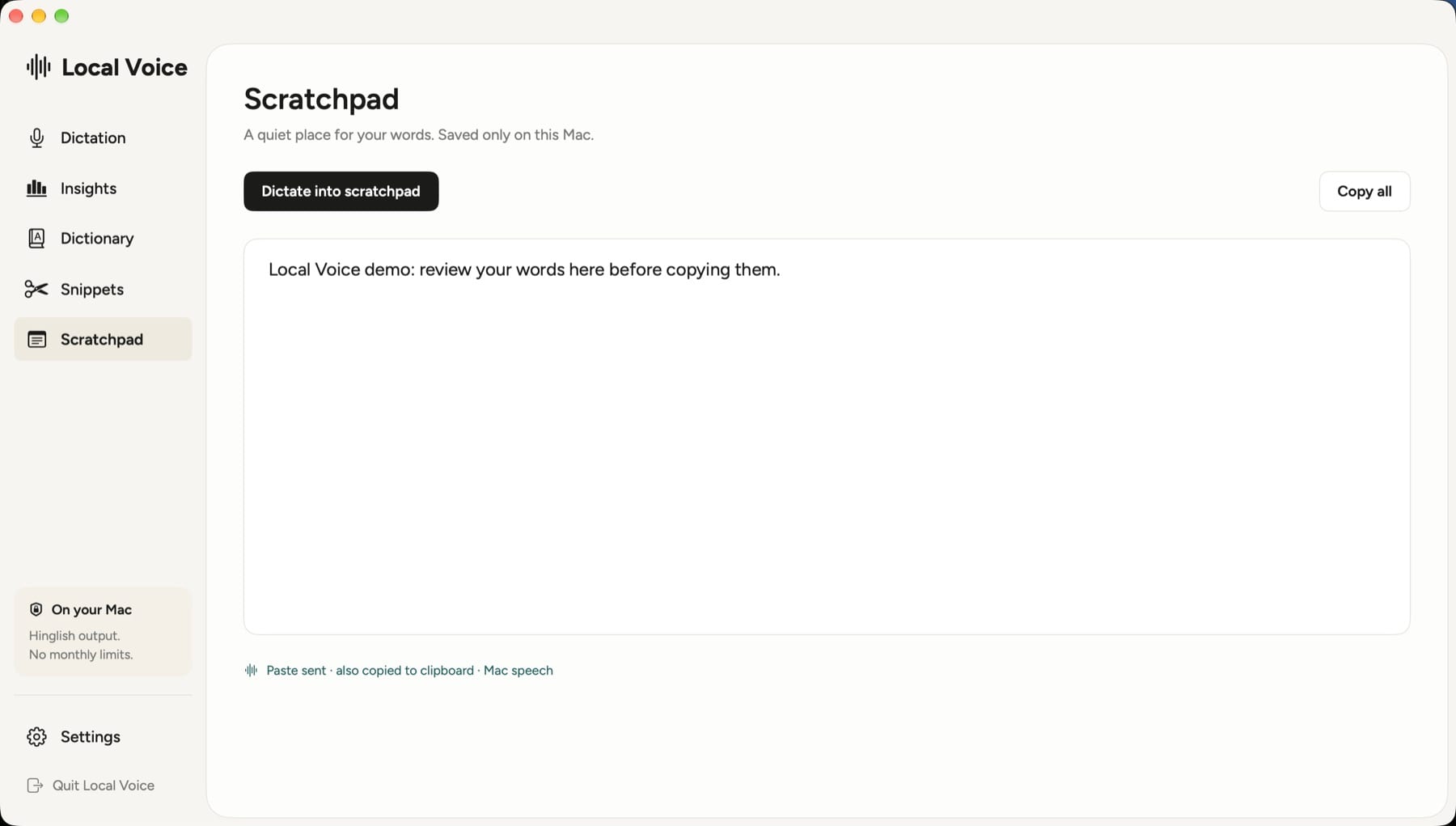
Dictate into a scratchpad saved only on your Mac, review and edit the text, then copy it all at once.
Dictionary and snippets
Teach it the spelling of names and terms you use, and set short phrases that expand into longer text.
Recovery when something fails
If processing fails, a recovery recording lets you retry or copy the recovered text instead of losing what you said.
Optional history
Transcript history is off by default. Turn it on to search recent dictations; turning it off removes saved history from disk.
How it works
Set up once, then dictate anywhere
Build from source
Clone the repository and run ./setup.sh. It installs whisper.cpp, downloads the models and opens the app.
Grant permissions
In Settings, allow Microphone and Accessibility so Local Voice can hear you and listen for the Fn key.
Choose an output
Pick English translation or Hinglish as spoken.
Tap Fn and talk
Speak naturally, tap Fn again, and review the text before you use it.
Why Local Voice
Built differently
Made for Hinglish
Many dictation tools handle Hindi as a separate language. Local Voice adds a transliteration step so mixed speech comes out as readable Latin-script Hinglish.
Local inference, no account
After setup, recognition runs on your Mac with no account, API key or monthly limit.
Open source you can inspect
The full Swift source and setup scripts are public, so you can read exactly what runs before you install it.
Is there a download?
Not yet. Local Voice is an experimental source build. You build it on your own Mac with ./setup.sh. There is no notarized, Apple-trusted binary, and prebuilt app bundles copied from another Mac are not supported.
What do I need?
An Apple silicon Mac with macOS 14 or later, Xcode Command Line Tools, Homebrew, Git and uv. Setup needs internet and several GB of free disk space for models. Intel Macs are not supported. The optional Qwen engine via MLX needs macOS 26.2 or later.
Does my voice leave my Mac?
Setup downloads the models from the internet. After that, local processing keeps speech recognition on your Mac. The private-server mode is disabled in the public source.
How accurate is it?
Accuracy and speed vary with your hardware, microphone and speech. Recognition and transliteration can make mistakes, especially with names, so review text before you use it. The dictionary helps with words you use often.
How much does it cost?
It is free to build and use. The repository does not include a license file yet.
What is it built on?
whisper.cpp and Whisper for speech, optional MLX/Qwen, and AI4Bharat IndicXlit for Hinglish transliteration. Some reliability patterns were adapted from the open-source Handy and OpenWhispr projects under the MIT license; their notices are included in the repository.
Local Voice is on its way
The source is public — build it yourself, or follow along as it matures.
More from Parth
 Closer
 Catch
 LoopStudio
 Palmdeck